TETRA-BlueStation — Complete Setup and Configuration Guide

This article is based on the TETRA-BlueStation Wiki. Full credit to the MidnightBlueLabs team for the original documentation.
Welcome to the TETRA-BlueStation guide — the documentation platform for BlueStation: a FOSS TETRA stack aimed at providing an extensible basis for TETRA experimentation and research.
⚠️ Experimental Software Warning
tetra-bluestation is highly experimental software.
- Interfaces, features, and internal behavior may change at any time.
- Things will break occasionally, sometimes in creative ways.
- New features and bug fixes are added frequently.
- Documentation and wiki content may lag behind the current code.
This project is intended for experimentation, research, and learning.
Do not rely on it for production use, safety-critical systems, or operational networks.
Table of Contents
- Introduction & Project Status
- Hardware & System Requirements
- Dependencies & Building
- Configuration
- Running TETRA-BlueStation
- Amplifying the SDR Output Signal
- Contributions, Forks & Issues
- Frequently Asked Questions
- Changelog
Introduction & Project Status
What Works
- Base station configuration (freqs, network identifiers, etc) supplied as TOML file
- Demodulation and modulation of most burst types
- Will broadcast SYNC/SYSINFO and is identifiable as a proper TETRA network
- Phy, Lmac, Umac, Llc are mostly complete for BS use
- Parsing/building code for all core TETRA PDUs across all OSI layers
- Registration of an MS on the running BS stack and group attachment works
- Voice codec, Group calls, interconnect to networked systems (TetraPack) works
- SDS and interconnects works
Not Functional / Not Implemented
- MS (Mobile Station, radio) and monitoring implementation not fully functional
General TETRA Design
The project closely follows the TETRA standard and adopts a modular message passing framework. Messages flow between TETRA entities through well-defined SAPs (Service Access Points).
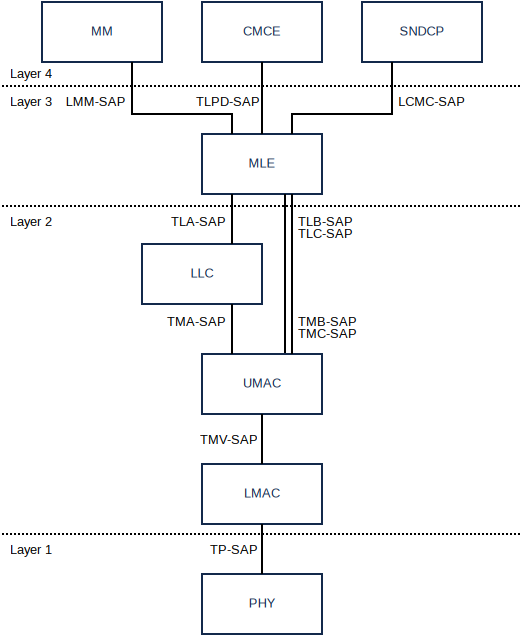
The project consists of modules corresponding to all TETRA components:
- PHY — Physical layer (SoapySDR backend or file backend for simulation)
- LMAC — Lower MAC: error detection/correction, burst handling
- UMAC — Upper MAC: unicast/multicast, UL scheduling, random access
- LLC — Link Layer Control: unicast links, acknowledgement, retransmission
- MLE — MLE: packet routing between LLC and upper layers
- MM — Mobility Management: location updates, group attach/detach
- CMCE — Call Control (skeleton)
- SNDCP — Packet data (skeleton)
An annotated log of a full connection is found in example_trace.txt in the repository.
Hardware & System Requirements
Computer / Host System
| Component | Minimum |
|---|---|
| CPU | Quad-core ARMv8 or x86_64 (RPi 4 or better) |
| RAM | 2 GB minimum (4 GB recommended) |
| Storage | SSD or fast SD card |
| USB | Stable USB 2.0/3.0 for SDR |
Real-time scheduling and CPU frequency scaling may significantly affect performance.
Operating System
- Tested with recent stable Debian releases
- On Raspberry Pi: Raspberry Pi OS Lite — Debian 13 (Trixie — 64 bit)
- Do NOT use the "Full" GUI image as it may interfere with some SDRs
Supported SDR Hardware
| Hardware | Supported | Notes |
|---|---|---|
| LimeSDR / LimeSDR Mini | ✅ | Full-duplex with timestamping |
| USRP B200/B210 | ✅ | Robust timing and sync |
| LibreSDR B205/B210 | ⚠️ | Custom bitstream required |
| SxCeiver | ✅ | Via SoapySX driver |
| PlutoSDR / Pluto+ | ✅ | Timestamped firmware mod required |
| LibreSDR ZynqSDR | ⚠️ | If timestamped firmware available |
| HackRF | ❌ | Half-duplex — unsuitable |
| BladeRF | ⚠️ | Expected compatible, not yet implemented |
Recommended Accessories
- RTL-SDR + SDR++ for monitoring
- SDRpp-tetra-demodulator plugin
Licensing & Regulatory Compliance
Operating a TETRA base station involves radio transmission. You are solely responsible for compliance with all applicable laws.
Key points:
- Only transmit on frequencies you are legally permitted to use
- Licensed amateurs: operate only within amateur radio bands
- Use shielded environments or dummy loads for testing
- Never transmit on frequencies allocated to operational TETRA networks
Dependencies & Building
The following instructions assume a Debian-based system.
General Dependencies
sudo apt update
sudo apt install -y --no-install-recommends \
  git make g++ cmake \
  libsoapysdr-dev \
  soapysdr-tools \
  libasound2-dev \
  clang llvm-dev libclang-dev
Install Rust:
curl https://sh.rustup.rs -sSf | sh
Hardware-Specific Dependencies
SxCeiver
cd
git clone "https://github.com/tejeez/sxxcvr.git"
cd sxxcvr/SoapySX
mkdir build && cd build
cmake ..
make
sudo make install
sudo ldconfig
LimeSDR
sudo apt install -y limesuite liblimesuite-dev limesuite-udev soapysdr-module-lms7
sudo udevadm control --reload-rules
sudo udevadm trigger
USRP
sudo apt install -y uhd-host libuhd-dev soapysdr-module-uhd
sudo uhd_images_downloader
PlutoSDR / Pluto+
Note: The stock firmware does not support hardware timestamping. You must install a custom firmware.
-
Flash timestamped firmware:
-
Install patched SoapyPlutoSDR driver:
git clone https://github.com/pgreenland/SoapyPlutoSDR.git -b sdr_gadget_timestamping
cd SoapyPlutoSDR
mkdir build && cd build
cmake ..
make -j$(nproc)
sudo make install
sudo ldconfig
- Configure USB access:
echo 'SUBSYSTEM=="usb", ATTR{idVendor}=="0456", ATTR{idProduct}=="b673", MODE="666"' | sudo tee /etc/udev/rules.d/90-libiio_pluto.rules
sudo udevadm control --reload-rules && sudo udevadm trigger
- Allow real-time priority — add to
/etc/security/limits.conf:
@users - rtprio 99
Clone and Build
git clone https://github.com/MidnightBlueLabs/tetra-bluestation
cd tetra-bluestation
git checkout main
. "$HOME/.cargo/env"
cargo build --release
To update:
git pull
cargo build --release
Configuration
All aspects of tetra-bluestation are configured through a single TOML file. A template is in example_config/config.toml.
cp example_config/config.toml config.toml
⚠️ Important: Configuration files are case-sensitive. All frequencies are in Hz, never MHz.
Quick Start — Minimum Changes
| Field | What to Do |
|---|---|
tx_freq | Set your desired Tx frequency (Hz) |
rx_freq | Set your desired Rx frequency (Hz) |
mcc / mnc | Set your network's Mobile Country/Network Code |
main_carrier | Calculate from Tx frequency (see formula below) |
duplex_spacing | Set to match your band plan |
This tool by BU2HB helps generate a working config.
Main Carrier (N) Calculation
main_carrier = (DL_frequency_Hz - base_frequency_Hz - freq_offset_Hz) / 25_000
Per ETSI TS 100 392-15:
base_frequency_Hzis the reference frequency for the selected bandfreq_offset_Hzis one of:-6250,0,+6250,+12500
Example (band 4, 400 MHz):
base_frequency_Hz = 400 000 000DL_frequency_Hz = 438 025 000freq_offset_Hz = 0
(438 025 000 - 400 000 000 - 0) / 25 000 = 1521
→ main_carrier = 1521
Configuration Sections Reference
Global Configuration
| Parameter | Default | Notes |
|---|---|---|
config_version | "0.6" | Must match format expected by running version |
stack_mode | "Bs" | "Bs" for Base Station |
debug_log | disabled | File path for verbose logging |
[phy_io] — PHY Layer
| Parameter | Default / Example | Notes |
|---|---|---|
backend | "SoapySdr" | RF backend |
tx_freq | 438025000 | Downlink transmit frequency (Hz) |
rx_freq | 433025000 | Uplink receive frequency (Hz) |
ppm_err | 0.0 | Frequency correction for SDR oscillator error |
For custom device selection, use the optional device field:
device = "driver=plutosdr,uri=ip:192.168.42.42"
device = "driver=lime,serial=123456789"
[net_info] — Network Information
| Parameter | Default / Example | Notes |
|---|---|---|
mcc | 204 | Mobile Country Code (3 digits) |
mnc | 1337 | Mobile Network Code (2–3 digits) |
[cell_info] — Cell Information
| Parameter | Default / Example | Notes |
|---|---|---|
freq_band | 4 | 1–5, 4 = 400 MHz TETRA band |
main_carrier | 1521 | Carrier index (see formula) |
duplex_spacing | 4 | 4 = 5 MHz spacing |
colour_code | 1 | 0–3, distinguishes adjacent cells |
location_area | 2 | Location Area Identifier |
registration | true | Enable registration support |
voice_service | true | Voice service flag |
timezone | disabled | IANA tz name, e.g. "Europe/Amsterdam" |
[brew] — TETRA Homebrew Protocol (Interconnects)
| Parameter | Default | Notes |
|---|---|---|
host | System-dependent | Brew server address |
port | 3003 | TCP port |
tls | true | TLS required for wss:// |
username | none | HTTP Digest auth username |
password | none | HTTP Digest auth password |
feature_sds_enabled | true | SDS forwarding |
Running TETRA-BlueStation
Basic Usage
./target/release/bluestation-bs ./config.toml
Real-Time Priority (Recommended)
For improved scheduling stability (lower jitter):
chrt -f 73 ./target/release/bluestation-bs ./config.toml
Running as a Systemd Service
A sample service file is provided at contrib/systemd/bluestation-bs.service.
Edit the file to match your setup (User, Group, WorkingDirectory, ExecStart), then:
sudo cp contrib/systemd/bluestation-bs.service /etc/systemd/system/
sudo systemctl daemon-reload
sudo systemctl enable bluestation-bs
sudo systemctl start bluestation-bs
Useful commands:
systemctl status bluestation-bs
journalctl -u bluestation-bs --output=cat -f
Logging
Enable debug logging in config.toml:
debug_log = "./verbose_log.txt"
Amplifying the SDR Output Signal
⚠️ Important: Most SDRs are not designed to directly drive a TETRA transmitter chain at operational power levels. External amplification requires careful assessment.
Direct SDR Output — No Amplification
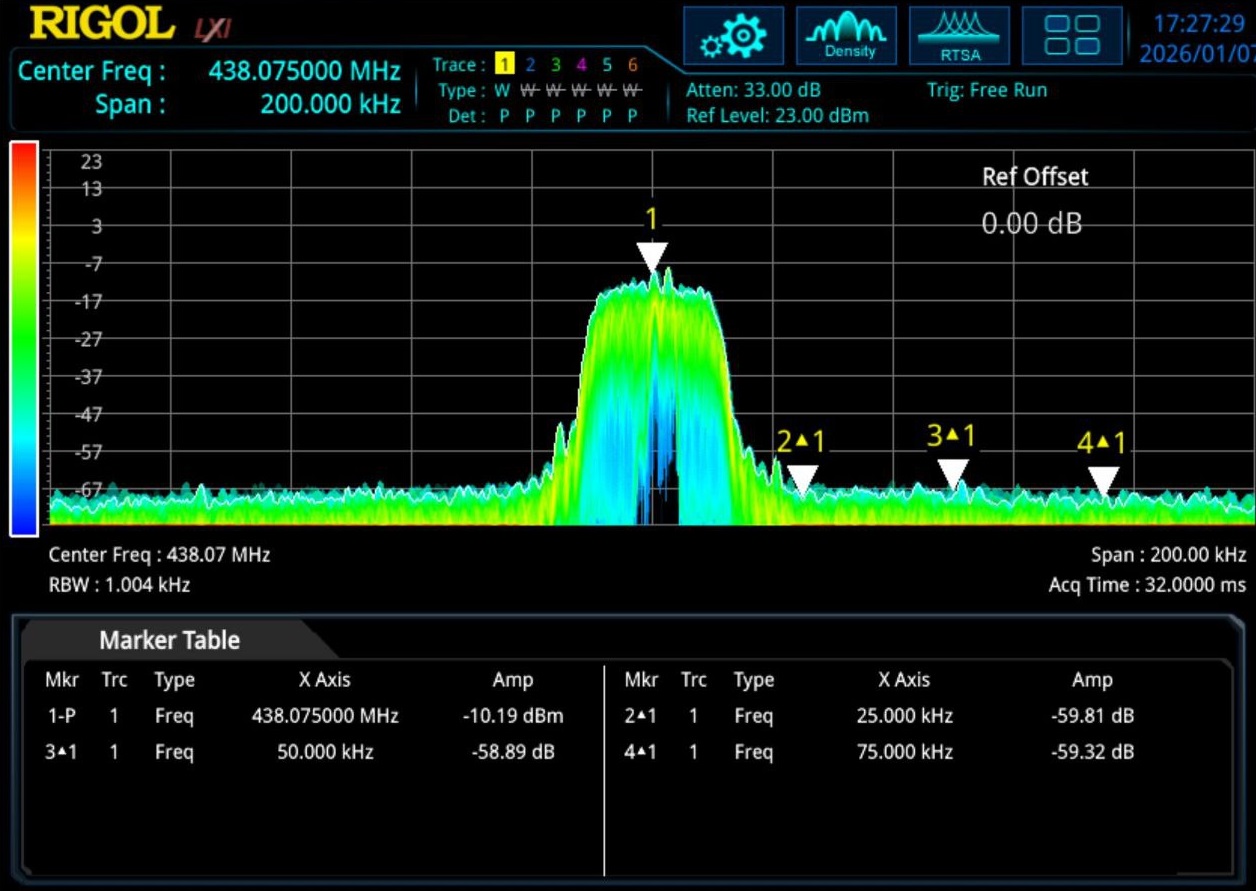
Below is the direct RF output from an SxCeiver without external amplification — spectral purity is generally good:
Excessive Drive Level (Near P1dB)
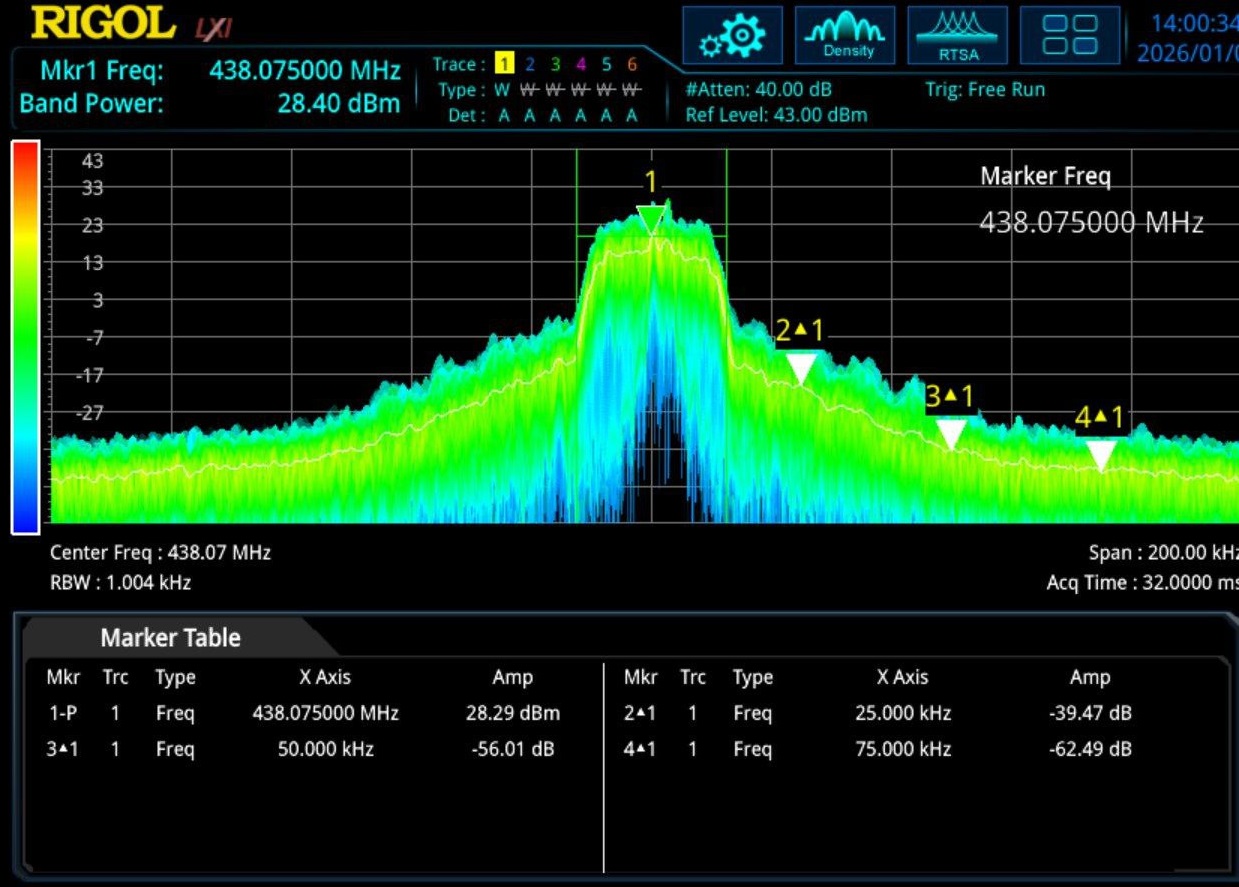
Pushing the amplifier too close to its P1dB point causes significant adjacent channel interference:
Proper Drive Level — Low ACP
Operating well below the P1dB point yields clean output even at useful power levels:
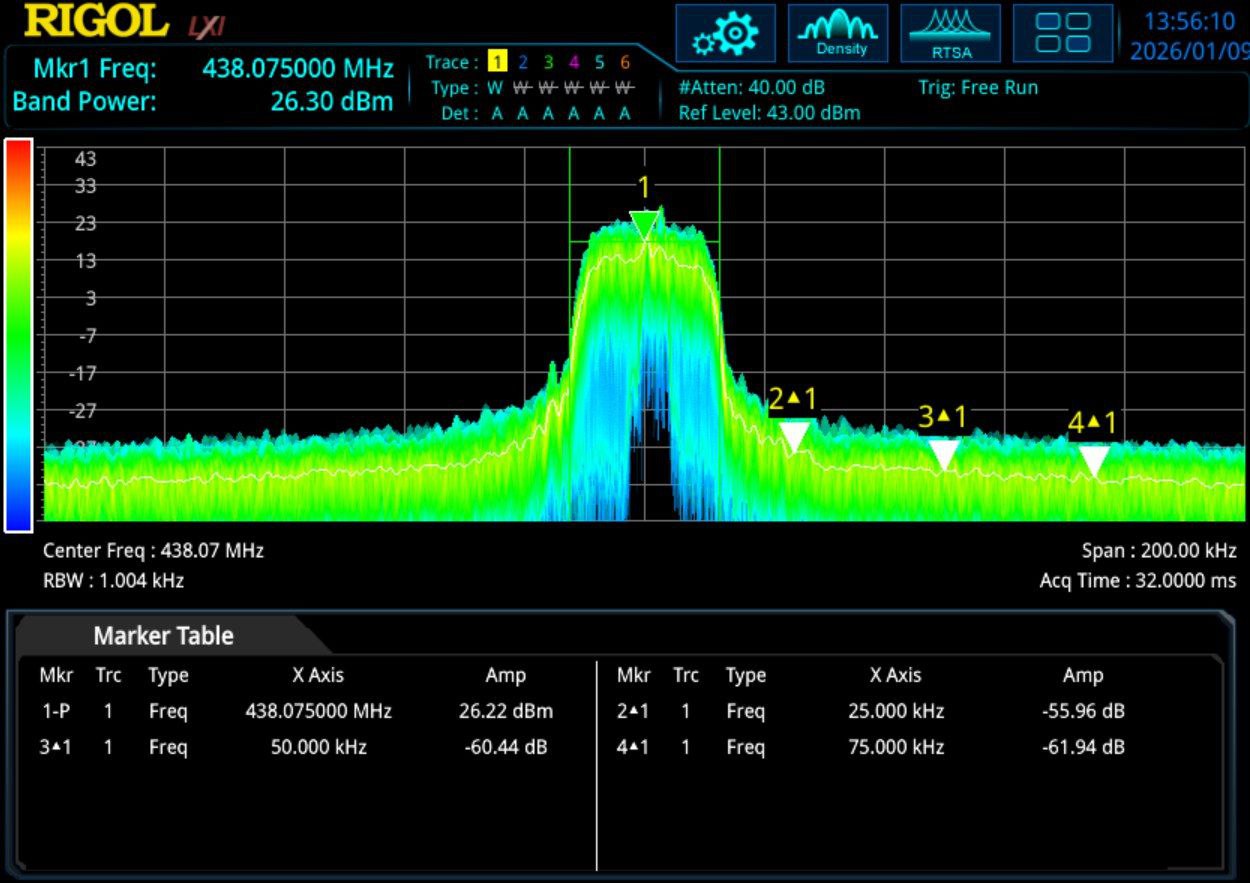
In this example, close to 1W of RF output is achieved while keeping adjacent-channel spectral spreading at a reasonable level.
How Commercial TETRA Transmitters Handle Amplification
- Operate far below the P1dB point (oversized amplifiers)
- Class A or Class AB operation (efficiency rarely exceeds ~20%)
- Linearization loop (Cartesian loop) for distortion pre-correction
- Tight filtering and closed-loop power control
Practical Notes
For most experimental and amateur scenarios:
- Start at very low output power
- Use a spectrum analyzer to verify spectral purity
- Two amplification stages used in the example: SPF5189 gain module + commercial TETRA repeater final amplifier
- The SPF5189 alone produces harmonics — filtering is essential
- A commercial final stage can draw ~2A standby current with significant thermal dissipation
Contributions, Forks & Issues
Contributing
Contributions are welcome. Preferred model: limited-scope, focused pull requests rather than large feature drops.
Wiki Contributions
All wiki content is sourced from the main repository. To contribute:
- Fork the tetra-bluestation-docs repository
- Make changes
- Submit a pull request
Even users with wiki write access should not edit the wiki directly. A GitHub Action automatically syncs content from the repository.
Issues
Use the issue template in the repository. Include logs and detailed reproduction steps.
Frequently Asked Questions
What is tetra-bluestation?
A free and open-source TETRA base station software stack for experimentation and research.
Is this ready for production?
No. See the experimental software warning.
May I connect it to TETRAPack / tmo.services?
Yes. TETRAPack is implemented via the Brew link protocol.
Is my SDR compatible?
Only SDRs with reliable full-duplex hardware timestamping are supported. See the hardware table above.
Can I run this on a Raspberry Pi?
Yes — Raspberry Pi 4 (2 GB) has been confirmed to work. Pi5 is the target platform going forward.
Is there a ready-made SD card image?
No. Build from source on a Debian-based system.
Does it support voice calls?
Group calls are supported. Full Duplex is being worked on.
Does it support SDS?
Yes.
Is it legal to run this?
You are solely responsible for compliance with local regulations.
Where can I get help?
Join the community Telegram group: https://t.me/+ZhT3bvs_LHUwNmQ0
Changelog
Refer to the full changelog on the project wiki for the complete history of changes, fixes, and additions across all released build levels.
Based on the TETRA-BlueStation Wiki by the MidnightBlueLabs team. Document compiled on 2026-05-15.